Archives for setup

Virus-Infected Android Phone Replacement and Secure Setup

Assisted with replacing a heavily virus-infected Android phone. Rather than copying the old phone and potentially bringing the same problems across, the new Android phone was set up from scratch.

Moved the customer’s SIM and phone contacts into their Google account so the contacts could sync safely to the new device. Configured Messenger, Facebook and other required apps, renewed the antivirus protection and checked the new phone was ready for normal use.

Once the required information had been transferred, the old infected phone was factory reset rather than reused with its existing software and settings.
Microsoft 365 Laptop Setup with Entra ID and Windows 11 Pro

Set up two new business laptops with Microsoft 365 and upgraded both systems to Windows 11 Pro. Added a new Microsoft 365 user and upgraded two users to Microsoft 365 Premium licensing.

Configured Microsoft Authenticator, email and SMS verification for secure sign-in, and connected both laptops to the organisation’s Microsoft Entra ID environment.

Completed an initial SharePoint setup and identified several items requiring follow-up, including moving files from personal OneDrive accounts into the business OneDrive and SharePoint environment. The customer was also provided with a list of preparation tasks before the next visit, including working with their accountant to determine the preferred business folder structure.

Additional Microsoft account and configuration issues were troubleshooted during deployment, with further updates and follow-up work planned to complete the setup.

Three PC Rebuilds, Microsoft Family & Printer Setup

Three computers were assessed and rebuilt from scratch with fresh Windows installations, updates, Microsoft accounts and Microsoft Family configured for the household.

The printer was also installed and configured across the working machines.

One older computer was no longer suitable for a reliable Windows rebuild due to its age and hardware limitations. Recommended either installing Linux to extend its useful life or replacing the machine with a newer PC.

Accessibility Technology and Online Safety Support

Reviewed a computer for suspicious software, scams and other online security risks, then configured accessibility applications and settings to make the system easier to use. Communication and recording tools were also set up and tested alongside accessible technology.

Bitdefender Setup and MFA Troubleshooting

Configured Bitdefender on a computer and phone, removed unnecessary security products and checked the general health of the PC. A failed multi-factor authentication issue was escalated to Bitdefender support for further investigation.

Business IT Discovery, Audio Setup and Security Check

Completed an IT discovery and troubleshooting session, including setup of two audio meeting devices and security checks on a phone and PC for signs of malicious activity. Findings were documented to support further planning and remediation.

Business Security Audit and Remote Management Setup

Completed a business IT and security audit across several Windows workstations. Bit-defender and remote management tools were deployed, previous malware damage was reviewed and the existing Microsoft 365 environment was documented for ongoing remediation.

New Windows PC and Microsoft 365 Setup

Set up a new computer from scratch with Windows, OneDrive, Bitdefender, Microsoft 365 and Microsoft Edge. The Microsoft ecosystem was integrated and the old computer was removed from service once the replacement was ready.

Microsoft 365 Admin Access and Security Review

Regained access to Microsoft 365 administration and configured Admin Centre access on desktop and mobile devices. The tenant, licensing, workstation setup and security risks were reviewed, with remediation planned for shared systems and administrator access.

Replacement Laptop Setup and Microsoft 365 Migration

Set up replacement Windows laptops with updates, Microsoft 365, OneDrive and SharePoint access. One machine was reinstalled to remove conflicts between personal Microsoft accounts and the business Microsoft 365 environment.

Dual-Screen PC Setup and Data Transfer

Set up a new dual-screen computer with login, email and web access. Documents and browser favourites were transferred from the old system, the printer was configured and the customer was shown the main features of the new PC.

Microsoft 365 User, Authenticator and Outlook Setup

Set up a new Microsoft 365 user with Microsoft Authenticator and Outlook, assisted with password issues and reviewed the requirements for Office desktop applications. SharePoint planning was also started for the new office environment.

Setup of a new shop in NSW

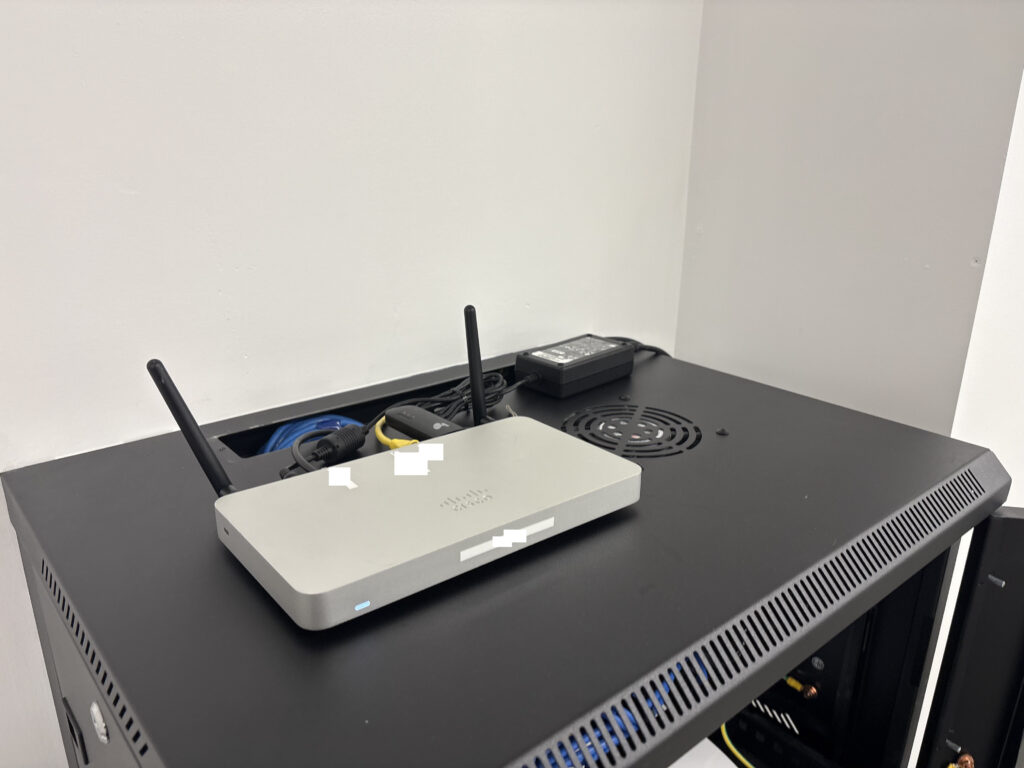
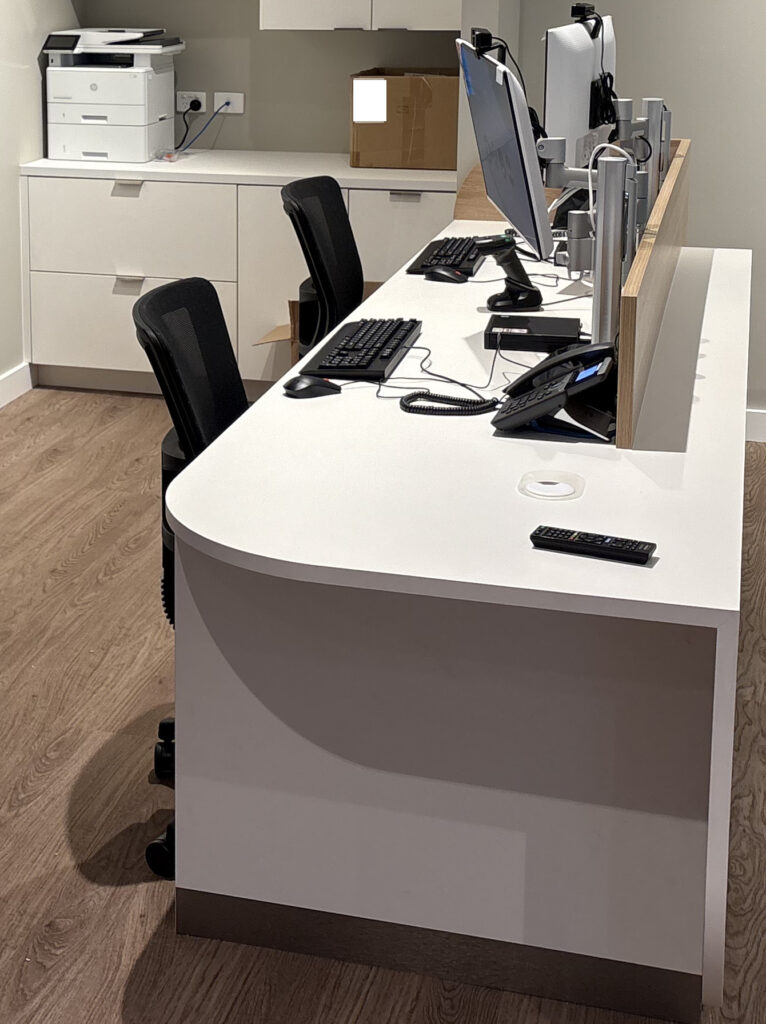
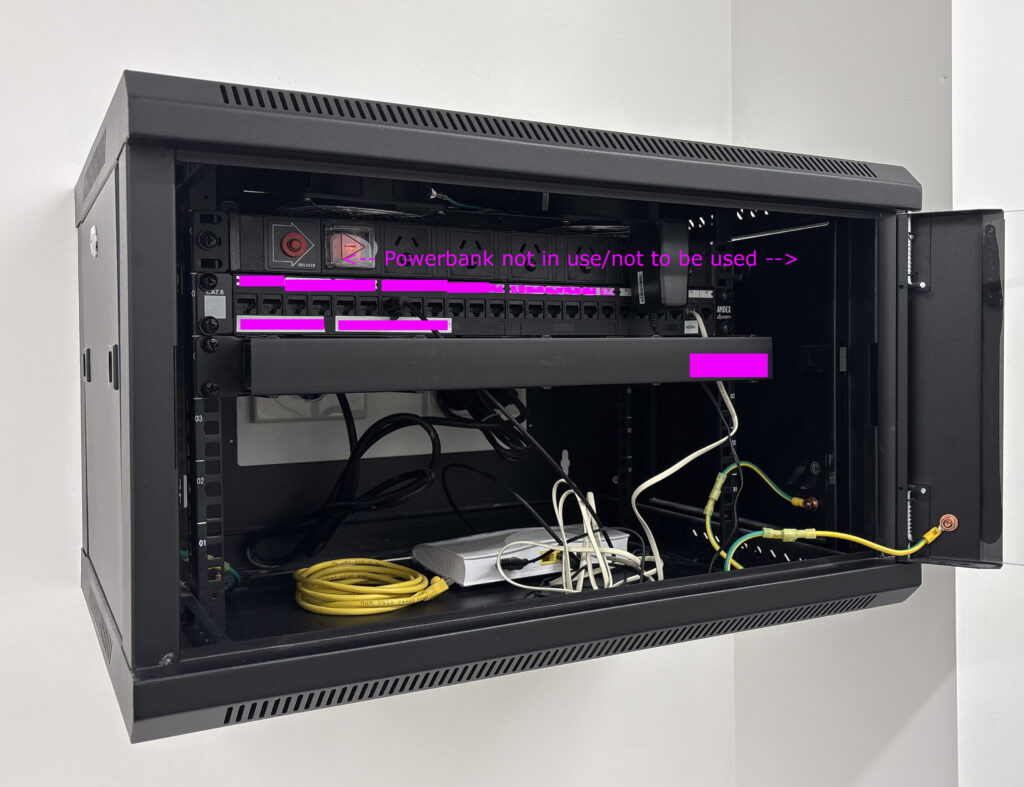
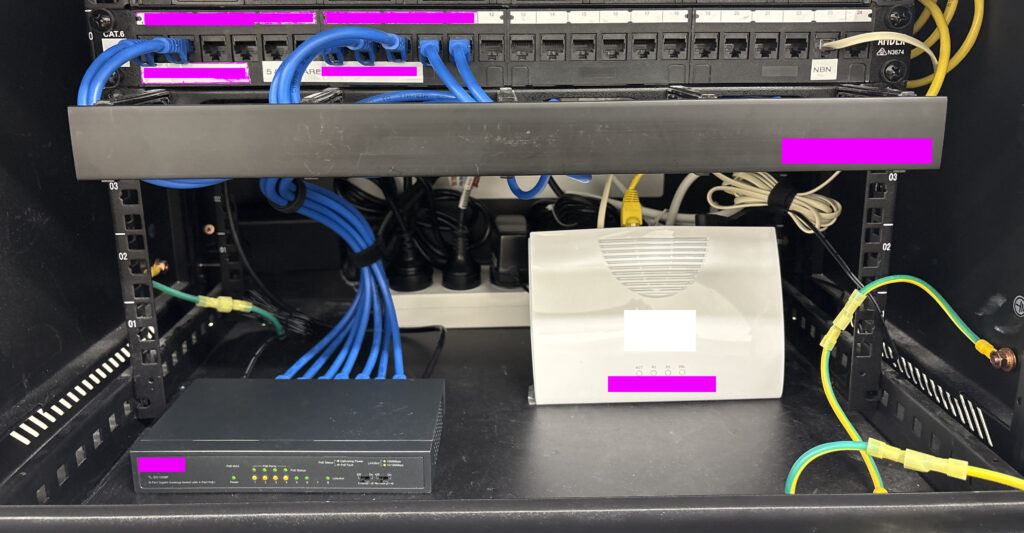
At Boss IT Solutions, this is the standard of work you can expect. In this new shop fit-out, we came in to patch, set up, and optimize the entire rack. From the Cisco router to the NBN modem, switch, phones, desktops, and peripherals. Everything is meticulously placed. We love jobs like this because they showcase the care and precision we bring. When you work with Boss IT, you get not just functionality, but a setup that’s clean and professional.

Tech Installed – Cisco | NBN Modem | 8 Port POE Switch | Desk phones | Barcode Scanner | EFTPOS Terminal | Desktops | Monitors | HP Laserjet | 2x Raspberry/TV devices

WordPress Staging Site Setup and Security Configuration

Set up a WordPress staging website, applied a new logo, created the initial service page structure and added contact information, navigation and footer content. Basic security changes were also made, including firewall configuration, disabling comments and resolving a two-factor authentication issue with the hosting provider.

New PC Setup with Email, Printer and Utilities

Set up a new PC, transferred browser bookmarks and configured email. LibreOffice, 7-Zip and antivirus software were installed, and a Canon printer was configured despite Windows 11 driver compatibility issues.

OneDrive Reorganization and Multi-Layer Backup Setup

Reorganized a large collection of files and reduced unnecessary OneDrive usage, then created external backups, system images and additional local copies. OneDrive was moved from the system drive to a larger internal drive, and File History and AOMEI backup settings were reviewed to provide a more reliable backup arrangement.

Audio, Website and Device Security Setup

Planned a home audio setup and a website for hosting and teaching music, while also fixing application issues on connected devices. Bit-defender was configured on a Mac and phone, iOS updates were completed and AI tools were set up for ongoing use.

Security Cleanup, Microsoft 365 and Outlook Setup

Removed Norton and other unnecessary software, configured Microsoft 365 and Outlook with a Gmail account. The browser and startup configuration were hardened, questionable extensions were removed and persistent security software remnants were cleaned up.

How To Setup & Play Brutal Doom on Linux

Linux Mint / Arch Linux

We have 2 Tutorials for the people out there who remember the times when you had to configure your OS to play games. Well, here we go again, except its because we want to 🙂 Brutal Doom Mod is amazing, so we decided as part of our christmas party plans and a gift to the world to Multiplayer this game. We have released 2 videos on how to setup on Windows or Linux (mint). We may release one on port forwarding later (to enable internet multiplayer)

Please Note: We had some sound issues on our new Linux Mint System we did not resolve before making the video, so may hear cracks, and sounds.
We’re also working on improving our resolutions of videos to at least 1080 but we always like to conserve space where we host.

We also made it work on ARCH LINUX 2024 Below

Screenshot 20240112 100828

NOTES for ARCH

use YAY for installing zandronum –> https://linux-packages.com/aur/package/zandronum
BUILD Doomseeker –> https://doomseeker.drdteam.org/git.php
Most other things are simular to the MINT install Video

If your using Arch we assume you know what your doing 😉

How To Setup & Play Brutal Doom 2 On Windows 10

As an adolescent, this game left an indelible mark on my formative years, shaping my journey into the realms of creativity and technology. Crafting numerous levels for DOOM ignited my passion for level design, a flame that burned brightly as I delved into creating experiences for Duke3D and Blood.

This pivotal chapter not only steered me towards a hobby in Game Development but also laid the foundation for my flourishing path in the world of Information Technology, all tracing back to the humble beginnings of DOOM on my trusty 386

Built A Linux Windows Dual Boot PC – Special Order for customer

https://youtu.be/bixkUw7BnWQ

IT Security, Privacy Browser and VPN Setup

Reviewed antivirus protection and installed a VPN across multiple devices. Brave was configured for privacy-focused browsing with favorites imported and synchronized to a phone, unnecessary applications and startup items were removed, and OneDrive and printer operation were also reviewed.

Multi-Device Printer and Network Troubleshooting

Investigated two PCs, a phone and three printers to determine the most reliable printing setup. Computers and a Mac were configured to use the selected network printer, while an unreliable printer was ruled out as not worth repairing.

Laptop Deployment and Multi-PC Hardware Updates

Set up two laptops with updates and remote management and reviewed endpoint-security requirements. Hardware updates were also completed across several additional computers as part of a wider workstation refresh.

Webcam, OBS and Security Software Setup

Set up a webcam and security software, installed OBS and confirmed the camera was working. Duplicate security-software accounts were also identified for consolidation and billing review.

Laptop Wi-Fi Driver and Malwarebytes Setup

Inspected a laptop, registered Malwarebytes and updated the Wi-Fi driver. Wireless connectivity was checked again after the driver change and the laptop was confirmed to be operating normally.

SSD Upgrade and Boot Configuration Assessment

Assessed a desktop for a storage upgrade and identified an internal SSD as the cleanest replacement for an awkward external-drive setup. BIOS boot settings and an old boot sector on the external disk were reviewed, while the existing backup was checked and confirmed to be working.

New Computer, Microsoft 365 and Dual-Screen Setup

Installed a replacement computer, transferred files and folders and configured Microsoft 365, Malwarebytes, browsers and favourites. A dual-screen workspace was set up and a separate external-drive backup was recommended.

Malware Check and New Printer Setup

Inspected two computers, identified one older machine with serious software problems and recommended retirement rather than further repair. The replacement computer was secured, and a new printer was installed for both printing and scanning.

Network Rack, Server and Specialist PC Assessment

Assessed a network rack, switching equipment and specialist workstations and confirmed the core switching and UPS setup was operating correctly. A specialist PC received an SSD and corrected RAM configuration, while server access requirements were documented for future workstation setup.

New Laptop, Wi-Fi Printer and Microsoft Account Setup

Set up a new laptop with webmail, security software and a Microsoft account, then configured an Epson printer over Wi-Fi. Data from the old PC was backed up for transfer and remote-support software was installed.

New Laptop Data Migration and File History Backup

Installed a new laptop and monitor, transferred the user’s data and configured Microsoft 365 and the Microsoft account. Malwarebytes, File History and remote-support software were also set up.

Two-Laptop Malware Cleanup and Wi-Fi Printer Setup

Cleaned malware from two laptops, removed unnecessary Norton and McAfee components and installed replacement endpoint protection. A Wi-Fi printer was configured, email issues were corrected and replacement of the older laptop was recommended because of long-term software damage.

New Laptop, Office 365 and Dual-Monitor Setup

Set up a new laptop and monitor, transferred data from the old PC and configured Microsoft 365, accounting software, two wireless printers and IMAP email. Dual-monitor support was enabled and internet instability was documented for follow-up.

New PC Installation, Microsoft 365 and Data Transfer

Set up a replacement PC after an attempted RAM upgrade on the old Windows 7 machine was not viable. Files were manually transferred, Microsoft 365 and OneDrive were configured and remote support was installed, while an older printer was left for further driver troubleshooting.