Diary

Microsoft 365, Outlook and Authenticator Account Recovery

Investigated ongoing Microsoft 365 and Outlook problems involving GoDaddy-related authentication errors, Microsoft Authenticator access, multiple Microsoft 365 accounts and unclear administrative ownership.

Initial troubleshooting included Outlook profile testing, Office authentication and Windows registry changes, but access was limited because Microsoft Authenticator could not be completed and it was unclear who controlled the Microsoft 365 tenant or Global Administrator account. Further investigation confirmed that an external website provider was involved in managing the environment, and I worked with them to coordinate account recovery and reset the affected Microsoft Authenticator registration.

Successfully restored webmail access, reconfigured Microsoft Authenticator on the customer’s phone and continued troubleshooting the remaining Outlook desktop connection issues. A separate Outlook profile was created for another business account, and differences between the two Microsoft 365 environments were investigated. OneDrive synchronisation was also reviewed, including legacy Outlook PST files stored within OneDrive.

On a later visit, resolved the GoDaddy-related Outlook configuration problem on another computer and gained access to the customer’s Microsoft 365 business account with limited administrative permissions. Reviewed the tenant configuration, account settings and device registration, and installed remote support software on the customer’s computers for future assistance.

Also assessed an older Windows 10 computer and recommended against further troubleshooting on that machine due to its age and existing problems. Further work may still be required to clarify Microsoft 365 ownership, administrator permissions and the long-term management of the customer’s Microsoft 365 environment.

When Web Developers Take Control of Domains and Walk Away

Three times this week, I’ve encountered the same problem: web developers taking control of a customer’s domain and DNS, then leaving the customer without the support they need.

It’s frustrating to encounter as an IT technician. For the business owner trying to keep things running, it can be far worse.

A business puts its trust in someone to handle the technical side. The provider takes over the accounts, makes the changes and becomes the person everyone depends on. If that provider then becomes unavailable or stops helping, the customer can be left struggling to regain control of essential business services.

In my opinion, anyone taking on that level of control needs to take the responsibility seriously.

Your domain affects more than your website

Your domain is part of your business identity. It appears in your email addresses, on your invoices and across your advertising.

DNS contains the records that help connect that domain to services such as your website and email. Changes to those records can affect whether those services work. Microsoft specifically warns that incorrect DNS records can cause email and service outages.

That makes domain and DNS management a serious responsibility.

When access and documentation are missing, another IT technician may have to spend time identifying providers, tracing accounts and chasing permissions before they can address the original problem.

The customer ends up paying for the confusion through extra support costs, delays and disruption.

Taking control comes with responsibility

A capable web developer can manage domains, hosting and related services well. The arrangement needs clear boundaries and accountability.

If you manage these services for a customer, they should understand what you manage, what they are paying for, how to obtain support and what happens if the relationship ends.

A one-off website build and an ongoing support agreement have different scopes. Those differences should be explained upfront. A customer should never have to discover the limits of an arrangement during an outage.

If you are moving on, closing the business or no longer providing a service, organise a proper handover. Make sure the customer has the information and access needed to appoint someone else.

Leaving a customer dependent on accounts only you can access, while becoming unavailable to help, is unacceptable in my view.

The business needs to retain control

Business owners should have a secure, documented way to access or recover control of their essential services.

For Australian .au domains, check who is recorded as the registrant—the domain licence holder. auDA’s rules require an agent registering a domain on someone else’s behalf to record that person as the registrant. Having a developer arrange the registration should still leave the correct customer recorded as the licence holder.

Access also needs to be checked service by service. Domain registration, DNS hosting, website hosting and Microsoft 365 administration can involve different accounts and permissions. Access to the domain account does not automatically provide administrator access to Microsoft 365. Microsoft’s setup process treats those as separate requirements.

“The web people handle it” leaves too much unanswered.

The business needs to know who handles each service and how it can authorise another technician to help when necessary.

Five questions every business owner should ask

You should be able to get clear answers to these:

  • Where is our domain registered, and who is the registered licence holder?
  • Who manages our DNS, website hosting and email services?
  • How does our business securely access or recover the relevant accounts, including authentication and recovery methods?
  • Who is responsible for renewals, and what support does our agreement include?
  • What is the handover process if we change providers or our current provider becomes unavailable?

Keep those answers somewhere your business can access. Ask for them while everything is working.

You can leave the technical work to qualified people while still retaining control and understanding the arrangement.

Customers deserve clarity and a workable exit

My view is that a good provider should make a customer’s business easier to manage. That includes keeping records, explaining responsibilities and cooperating with other technicians when the customer needs help.

Customers should feel confident that they can get support, recover access and change providers without their business being left in limbo.

That is the standard I believe our industry should work towards.

If you are unsure who controls your domain, DNS or business email, BOSS IT Solutions can help you review the setup, identify gaps in access and documentation, and work out what needs to happen next.

Your business should retain control of the services it depends on.
Enterprise Printer Upgrade and Secure IT Asset Disposal

Completed an enterprise printer refresh for a major retail business, replacing three older multifunction printers with new Color Enterprise systems across multiple departments.

The work included matching replacement equipment to the existing asset schedule, updating printer firmware, recording the old device configuration, configuring network connectivity and hostnames, and coordinating the changeover with the remote IT support team.

Secure asset disposal was performed

Cyberattack Response and Server Isolation

Assisted a firm following a cyberattack affecting its onsite IT environment. Worked alongside the firm’s external IT provider to isolate affected onsite servers from the network, reduce the risk of further spread and help protect remaining systems while the incident was investigated.

The immediate focus was containment, limiting network exposure and supporting the external IT provider with the onsite response.

Microsoft 365, Google Workspace and DNS Audit

Investigated two business domains using a mixture of Microsoft 365, Google Workspace and different DNS providers. One business had already been migrated to Microsoft 365 but still contained legacy Google verification, DKIM and SPF records that require further checking before removal.

The second business still relies on Google Workspace for email, but its DNS is controlled through a separate hosting environment rather than the normal domain management account. Reviewed current Google Workspace billing and identified a potentially redundant subscription and an additional licence that may no longer be required.

Estimated potential savings are approximately $32.67 per month, subject to Google’s billing commitments and confirmation that no important data or services still depend on the accounts. No DNS records, subscriptions or licences were removed during the investigation. Further work will include recovering administrator access, checking stored Google data, identifying the DNS administrator and reviewing Microsoft 365 security.

Microsoft 365, SharePoint and New Business PC Setup

Fixed the user’s Microsoft 365 login and Authenticator setup, then moved company documents from a personal OneDrive account into the new business SharePoint environment. Configured Microsoft Edge to sign in correctly and added the SharePoint site to favourites for easier access.

Set up the printer on two new PCs, removed unnecessary pre-installed software and confirmed access to the required shared mailboxes. The customer will now test the new setup during normal work and document any issues for review at the next visit.

Virus-Infected Android Phone Replacement and Secure Setup

Assisted with replacing a heavily virus-infected Android phone. Rather than copying the old phone and potentially bringing the same problems across, the new Android phone was set up from scratch.

Moved the customer’s SIM and phone contacts into their Google account so the contacts could sync safely to the new device. Configured Messenger, Facebook and other required apps, renewed the antivirus protection and checked the new phone was ready for normal use.

Once the required information had been transferred, the old infected phone was factory reset rather than reused with its existing software and settings.

Windows 10, Printer and Home Network Troubleshooting

Investigated an older Windows 10 computer and printer setup after printing stopped working following the removal of the customer’s previous home internet service.

The customer preferred to continue using their existing equipment and iPad rather than purchase a new computer or reconnect permanent internet, so every reasonable effort was made to get the current setup working within those limitations.

The Windows 10 computer was configured with Google Chrome and LibreOffice to provide a usable alternative to Microsoft applications. As Windows 10 is now outside normal support and the computer was extremely slow, even basic software and driver installation took considerable time.

Multiple attempts were made to restore printing. The printer was tested over Wi-Fi, through the iPhone hotspot and directly via USB to the Windows computer. Printer firmware was updated and the full manufacturer driver package was installed, but printing still could not be restored reliably.

With several ageing and potentially unsupported devices involved, it was not possible to isolate the fault to one component. The problem may involve the printer, the Windows 10 computer, hotspot limitations, compatibility with the older iPhone, or a combination of these factors.

Recommended restoring a proper home internet connection with a router, as the printer had previously worked when a normal home network was available. The customer was also provided with options for a replacement printer and newer PC or Mac if the existing equipment continues to prove unreliable.

Microsoft 365 Laptop Setup with Entra ID and Windows 11 Pro

Set up two new business laptops with Microsoft 365 and upgraded both systems to Windows 11 Pro. Added a new Microsoft 365 user and upgraded two users to Microsoft 365 Premium licensing.

Configured Microsoft Authenticator, email and SMS verification for secure sign-in, and connected both laptops to the organisation’s Microsoft Entra ID environment.

Completed an initial SharePoint setup and identified several items requiring follow-up, including moving files from personal OneDrive accounts into the business OneDrive and SharePoint environment. The customer was also provided with a list of preparation tasks before the next visit, including working with their accountant to determine the preferred business folder structure.

Additional Microsoft account and configuration issues were troubleshooted during deployment, with further updates and follow-up work planned to complete the setup.

DNSSEC and Cloudflare DNS Configuration Repair

Investigated a website that was inaccessible through Google Public DNS despite appearing to work on some networks. The domain had previously been moved between DNS providers and was using a mixture of Cloudflare and another DNS service, resulting in conflicting DNS and DNSSEC configuration. Reviewed the nameserver delegation, DNS records and DNSSEC settings, corrected the configuration and removed the conflicting setup. Verified that the domain and website were resolving correctly again through public DNS services including Google 8.8.8.8.

Microsoft 365, Cloud Account and Subscription Cleanup

Reviewed and cleaned up multiple cloud accounts, mobile subscriptions and the existing Microsoft 365 environment. Identified and cancelled unnecessary recurring subscriptions (over $1000 a year, documented which Google accounts were responsible for remaining services, and discussed simplifying future account management. Reviewed the Microsoft 365 tenant including users, groups, devices and administrative access, and identified a OneDrive camera backup conflict between personal and business accounts for further investigation. Also reviewed a separately managed business email and domain environment and discussed the option of consolidating it into the existing Microsoft 365 tenant. No disruptive migration or DNS changes were made pending further review of mailboxes, licensing and existing dependencies.

Website Down Due to Billing Issue

Investigated a Legal firms website outage and reviewed the associated hosting account. The issue was traced to a billing problem rather than a technical website fault. Unwanted services were removed, the account was corrected to retain only the required domains, and a revised invoice was arranged. A follow-up check was done to ensure the website returned online.

Setup small business on entra/intune and SSO

Upgraded ##### from Microsoft 365 Business Standard to Business Premium, upgraded machine from Windows 11 Home to Windows 11 Pro ($169), joined the PC to Microsoft Entra ID, enrolled the PC with Microsoft Intune, and confirmed Entra account is a local administrator. The original Gmail/Microsoft profile has been retained. Next step is more machine and users, SharePoint and printer.

Consolidated Malwarebytes on MacOS

Checked printer and maintenance checks. Printer is working. Checked current multi subscription to malwarebytes and consolidated to 1 subscription with 10 licenses. Updated iOS and checked macOS for issues. Worked on ######### iPhone and updated. All devices now have the single malwarebytes account and got extra 3 months for rolling accounts into 1.

Microsoft 365, Entra ID and Intune Review

Reviewed Microsoft 365 licensing, security, Entra ID and Intune requirements for a business environment. The session focused on identifying the current configuration and planning the next steps for licensing, device management and security.

Digital Research, File Organization and PDF Support

Provided computer support for an independent research project, including organizing research material, adding photographs, managing files and preparing documents in PDF format. Guidance was also provided on maintaining a clearer digital workflow and using computer programs more confidently.

BitDefender and Printing Via Apps

Setup printer app and scanning. Logged bit-defender in. Setup custom links. Checked everything is ok

HP Laptop Failure – eMMC Storage Diagnosis

Customer laptop was taken offsite for further diagnosis after ongoing Windows and networking issues. During testing, the 64GB eMMC storage progressively failed and eventually stopped appearing in the BIOS.

Because the eMMC storage is soldered directly to the motherboard, replacement is not practical or cost-effective. The laptop is also quite underpowered, so the recommended option was to replace the computer rather than spend more money repairing it.

Gave customer a Spec to look for at a local retailer.

Three PC Rebuilds, Microsoft Family & Printer Setup

Three computers were assessed and rebuilt from scratch with fresh Windows installations, updates, Microsoft accounts and Microsoft Family configured for the household.

The printer was also installed and configured across the working machines.

One older computer was no longer suitable for a reliable Windows rebuild due to its age and hardware limitations. Recommended either installing Linux to extend its useful life or replacing the machine with a newer PC.

BitLocker Recovery Failure and Windows Reinstallation

Machine was taken offsite for further work after BitLocker recovery was unsuccessful. As access to the existing Windows installation could not be recovered, Windows was reinstalled from scratch to get the computer operational again.

Accessibility Technology and Online Safety Support

Reviewed a computer for suspicious software, scams and other online security risks, then configured accessibility applications and settings to make the system easier to use. Communication and recording tools were also set up and tested alongside accessible technology.

Foxtel iQ Troubleshooting, Internet Check and Speaker Repair

Troubleshooted a Foxtel iQ service and internet connection with Telstra support. The iQ box was reset as instructed and no internet dropouts or connection problems occurred while onsite. A separate speaker issue was also resolved. Customer was advised to monitor the service and record the date and time of any future dropouts for further investigation with Telstra.

Microsoft 365 Not Opening – Office Repaired and Reinstalled

Microsoft 365 would not open due to missing or corrupted Office files, and the normal uninstall process was also failing because the Microsoft Get Help app would not launch. After checking firewall and proxy settings, the damaged Office installation was manually removed and Microsoft 365 was reinstalled from scratch. Office applications were then tested and confirmed working normally.

Bitdefender Setup and MFA Troubleshooting

Configured Bitdefender on a computer and phone, removed unnecessary security products and checked the general health of the PC. A failed multi-factor authentication issue was escalated to Bitdefender support for further investigation.

Replacing a Faulty Laptop Docking Station

Attended a site where a laptop would intermittently lose access to external monitors, keyboard and network connectivity when connected via a USB-C dock. Testing confirmed the notebook itself was operating normally and the issue could be reproduced across multiple docking sessions. The docking station was replaced and all peripherals were retested including dual display output, Ethernet connectivity and USB devices. System functionality was confirmed before handover.

Investigating Slow Office Network Performance

Investigated reports of inconsistent network performance affecting multiple workstations. Conducted testing of switch ports, patch leads and endpoint connectivity before identifying a bottleneck within the local network infrastructure. Connectivity was restored and throughput verified through further testing across affected devices.

Deploying a New Business Workstation

Prepared and deployed a replacement workstation for a business user. Work included operating system updates, Microsoft 365 configuration, printer setup, email verification and migration of user data. All business applications were tested and confirmed operational prior to completion.

Business IT Discovery, Audio Setup and Security Check

Completed an IT discovery and troubleshooting session, including setup of two audio meeting devices and security checks on a phone and PC for signs of malicious activity. Findings were documented to support further planning and remediation.

Business Security Audit and Remote Management Setup

Completed a business IT and security audit across several Windows workstations. Bit-defender and remote management tools were deployed, previous malware damage was reviewed and the existing Microsoft 365 environment was documented for ongoing remediation.

Microsoft 365 Email Delivery and DNS Troubleshooting

Investigated Microsoft 365 email delivery problems across multiple accounts and computers. Exchange Online mail flow, tenant configuration and DNS records were reviewed, test messages were performed and additional email security records were added to DNS.

iMac Data Recovery – Over 2TB Recovered

Performed data recovery from a faulty iMac and recovered more than 2TB of mixed files. The recovered data required significant sorting and recovery work because of the condition of the original storage.

New Windows PC and Microsoft 365 Setup

Set up a new computer from scratch with Windows, OneDrive, Bitdefender, Microsoft 365 and Microsoft Edge. The Microsoft ecosystem was integrated and the old computer was removed from service once the replacement was ready.

Local Network File Share for Business Exports

Configured a local network share for business export files so authorized staff could access them across the LAN without interrupting the workstation used to generate the reports. The change provided a simpler interim workflow while a longer-term SharePoint solution was planned.

Microsoft 365 Admin Access and Security Review

Regained access to Microsoft 365 administration and configured Admin Centre access on desktop and mobile devices. The tenant, licensing, workstation setup and security risks were reviewed, with remediation planned for shared systems and administrator access.

SharePoint and OneDrive Business File Remediation

Corrected a OneDrive configuration where personal storage was conflicting with business SharePoint access. Organizational SharePoint synchronization was configured and a plan was developed to move business exports away from individual user storage into a shared SharePoint location.

Replacement Laptop Setup and Microsoft 365 Migration

Set up replacement Windows laptops with updates, Microsoft 365, OneDrive and SharePoint access. One machine was reinstalled to remove conflicts between personal Microsoft accounts and the business Microsoft 365 environment.

Laptop Wi-Fi Fault Diagnosis and Ethernet Workaround

Investigated a laptop that was stuck in Airplane Mode and could not restore Wi-Fi. Safe Mode and a USB Wi-Fi adapter were tested, and a wired Ethernet connection was provided as a reliable workaround while a Windows reinstall or deeper hardware diagnosis was considered.

TV Power Fault and Remote Troubleshooting

Investigated a TV that was not powering on correctly and found a loose power connection. The TV was removed, connections were checked, the power issue was corrected and the unit was remounted before a remote support help-desk check confirmed normal operation.

Desktop Optimization and NVMe SSD Upgrade Assessment

Optimised a desktop computer by hardening the browser, removing bloatware and unnecessary applications, cleaning disk space and using WinDirStat to identify large files. NVMe SSD compatibility was also assessed and upgrade options were recommended.

Mailbox Backup and General PC Health Check

Completed a manual backup of an email mailbox and checked the general health of the computer. The work ensured an additional copy of important mail data was available before further changes were made.

iMac Startup Failure and Data Recovery Diagnosis

Diagnosed an iMac that failed to boot and displayed a startup disk error. The internal drive was detected but the APFS volume would not mount, even from USB recovery, indicating serious filesystem corruption or possible drive failure. Standard recovery attempts were unsuccessful and restore or professional data recovery options were recommended.

Apple, iCloud and WordPress Support

Troubleshot Apple and iCloud access, reviewed device security and password requirements, and planned accessibility improvements. WordPress pages and posts were also cleaned up to make the website easier to manage.

Acrobat PDF Display Troubleshooting

Investigated a concern where PDF documents appeared differently when received by other people. Explained that the appearance can vary depending on whether the recipient opens the PDF in Acrobat, a browser or another PDF viewer, and confirmed the behavior was viewer-related rather than a fault in the document.

Dual-Screen PC Setup and Data Transfer

Set up a new dual-screen computer with login, email and web access. Documents and browser favourites were transferred from the old system, the printer was configured and the customer was shown the main features of the new PC.

Windows Profile Repair and Outlook Reinstallation

Troubleshot a corrupted Windows user profile and Outlook connection problems. The Windows profile was recreated and Outlook was reinstalled after an incorrect or damaged Outlook installation was suspected of causing account connection failures.

Microsoft 365 User, Authenticator and Outlook Setup

Set up a new Microsoft 365 user with Microsoft Authenticator and Outlook, assisted with password issues and reviewed the requirements for Office desktop applications. SharePoint planning was also started for the new office environment.

Zoom and Microsoft 365 Integration Review

Investigated Zoom integration with Microsoft 365 and reviewed how the existing Zoom account was connected to the business domain and calendar services. The configuration was checked and a cleaner account structure was recommended for future management.

Email Password, Wi-Fi and PC Security Support

Restored access to an email account after a forgotten password, checked that Bitdefender was operating correctly and confirmed the PC was running normally. A separate Wi-Fi issue was also resolved.

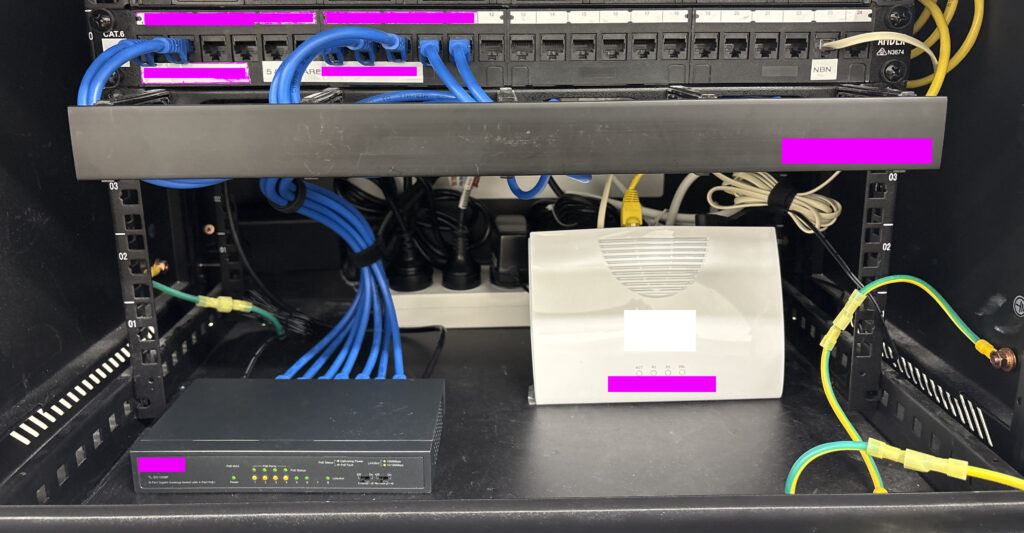
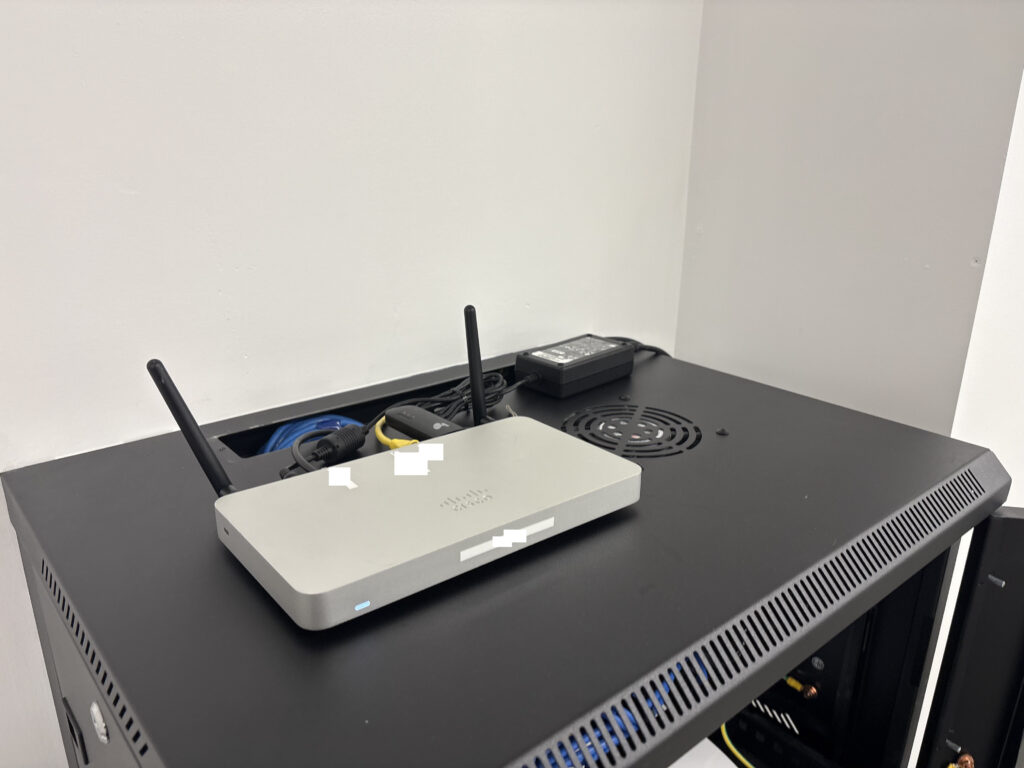
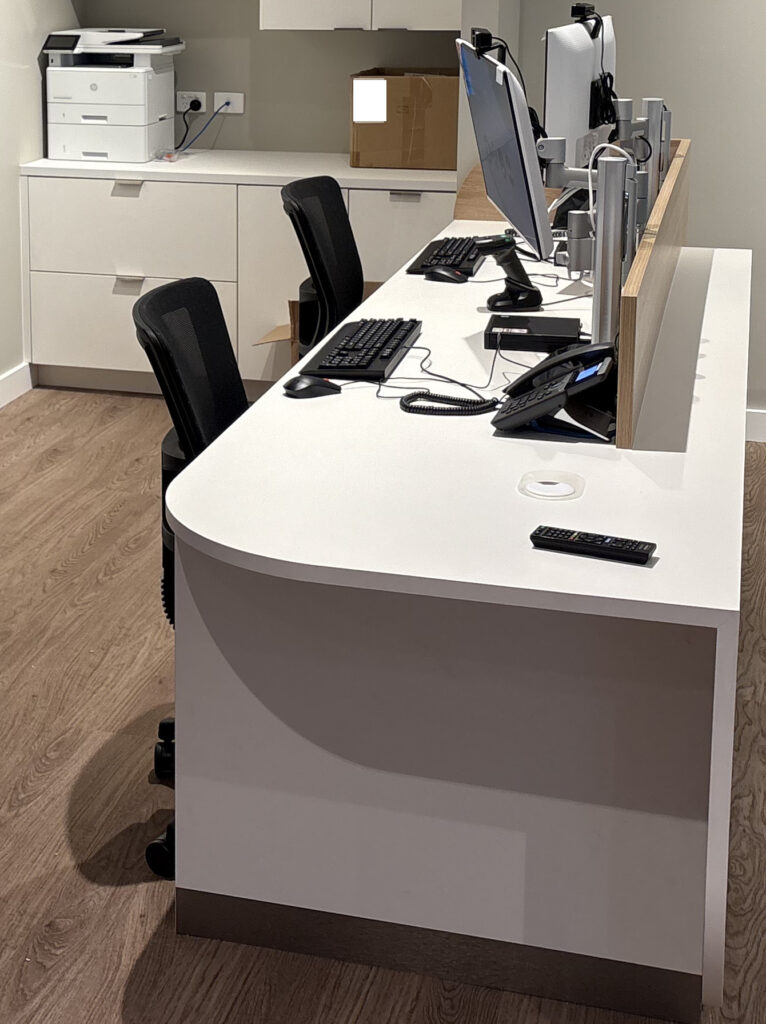
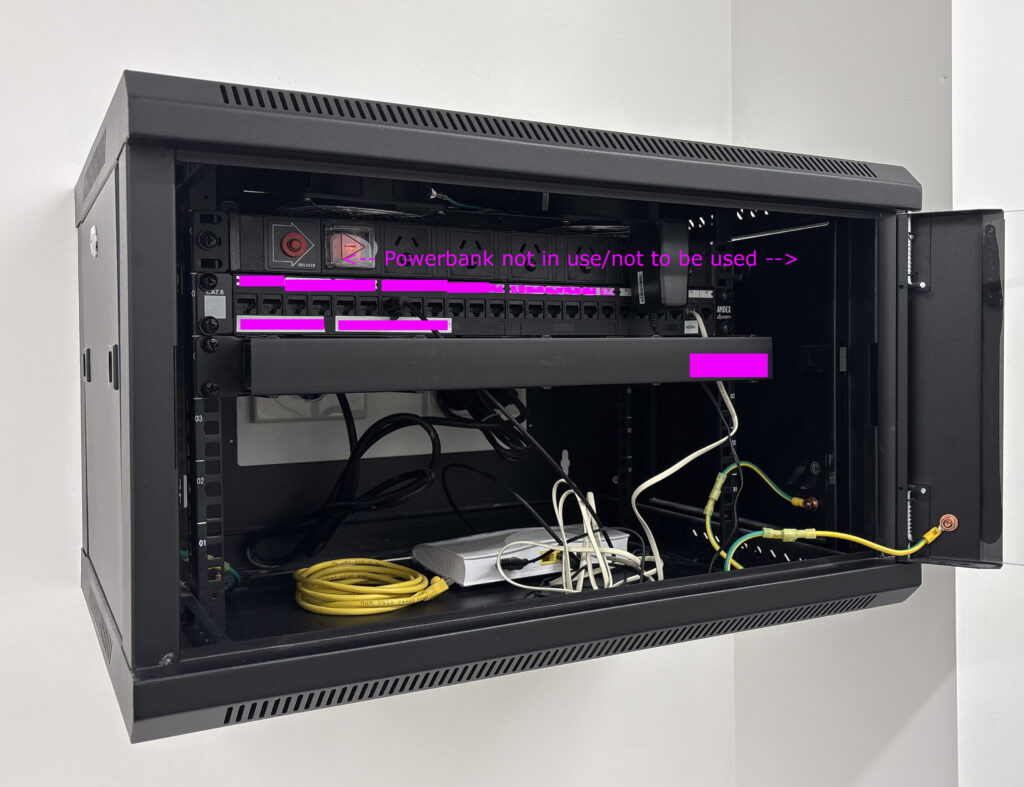
Setup of a new shop in NSW

At Boss IT Solutions, this is the standard of work you can expect. In this new shop fit-out, we came in to patch, set up, and optimize the entire rack. From the Cisco router to the NBN modem, switch, phones, desktops, and peripherals. Everything is meticulously placed. We love jobs like this because they showcase the care and precision we bring. When you work with Boss IT, you get not just functionality, but a setup that’s clean and professional.

Tech Installed – Cisco | NBN Modem | 8 Port POE Switch | Desk phones | Barcode Scanner | EFTPOS Terminal | Desktops | Monitors | HP Laserjet | 2x Raspberry/TV devices

Outlook Mailbox Re-import and Contact Recovery

Provided remote support to re-import a mailbox after email corruption, checked auto-responder settings and confirmed contacts were available in the new Outlook. The work focused on restoring a usable mailbox and normal email workflow.

Microsoft 365 Security Hardening and Recovery Planning

Implemented Microsoft 365 baseline security recommendations, enabled self-service password reset and reviewed the tenant for legacy accounts and excessive privileges. A dedicated break-glass administrator account was also created to provide secure recovery access if normal administrator accounts become unavailable.

Microsoft 365 Exchange Email Migration

Prepared and completed an email migration to Microsoft 365 Exchange, including a PST backup, DNS changes and mail-flow testing. A new Outlook profile and Microsoft Authenticator were configured, and more than 16GB of existing email was imported into the new mailbox.

Windows, Wi-Fi, Printer and Phone Maintenance

Completed general maintenance on a Windows laptop and confirmed Windows Update and Microsoft account status. Wi-Fi, printer and Gmail issues were fixed, a phone was cleaned of unwanted software, Bit-defender was installed and the phone operating system was updated.

Microsoft 365 Tenant Lockout and Migration Planning

Investigated a Microsoft 365 tenant lockout and attempted to regain administrative access through Microsoft support. The potential impact of a future email migration was also reviewed with the relevant software provider so the migration could be planned safely.

BigPond Email Password and Microsoft 365 Tenant Support

Provided remote support to restore a BigPond email account in Outlook after a password problem. A separate Microsoft support case was also raised to address an abandoned Microsoft 365 tenant that was preventing normal administration.

Windows PIN Lockout, Disk Check and Backup Maintenance

Resolved a Windows PIN lockout, corrected a disk check error and updated the AOMEI backup configuration. Browser security settings were tightened, crypto-mining protection was enabled and unnecessary startup items were disabled to improve performance.

PDF Opening and Default App Troubleshooting

Provided remote assistance for PDF files that were not opening correctly. The PDF application and file-opening behavior were checked so documents could be opened normally again.

Website Redirects, Mobile Layout and reCAPTCHA Fixes

Completed minor website maintenance including six domain redirects, mobile layout and theme adjustments, and corrections to existing page content. A reCAPTCHA configuration issue was also fixed.

Microsoft 365 and LEAP Legal Integration Support for Law Firms

Assisted a legal practice with integrating its business domain and Microsoft 365 email environment with LEAP. Reviewed the existing Microsoft 365 and Exchange configuration, connected the required domain and email services to LEAP, and checked that Outlook and Microsoft 365 were working correctly with the legal practice management system. The setup was completed with the aim of providing a more reliable and manageable email environment for day-to-day legal work.

Google Workspace, IMAP and Microsoft Domain Troubleshooting

Resolved Google Workspace mail issues by creating an application password and setting up a clean IMAP-only Outlook profile. Work also continued on a Microsoft tenant problem, including adding a DNS TXT record to prove domain ownership and planning a possible future move to Exchange.

WordPress Staging Site Setup and Security Configuration

Set up a WordPress staging website, applied a new logo, created the initial service page structure and added contact information, navigation and footer content. Basic security changes were also made, including firewall configuration, disabling comments and resolving a two-factor authentication issue with the hosting provider.

Bit-defender Repair and OneDrive Storage Reorganization

Repaired a corrupted Bit-defender installation and confirmed printing was working. Files were reorganized into OneDrive, duplicate data was reduced, OneDrive was moved to the larger internal drive and File History was configured on an external disk for local versioned backups.

How a Landfill PC Exposed Years of Insecure IT Practices

A new client told me they’d bought a brand-new Windows 11 PC. It even had the shiny sticker on the front. But inside? It was a landfill special:

  • 4 GB of soldered RAM, non-upgradeable
  • Slow eMMC storage barely faster than an SD card
  • Bargain-bin Intel N-series CPU that wheezed opening File Explorer
  • Windows 11 Home slapped on as if it were a feature, not a red flag

Sure, it “ran” Windows 11, but just barely. That wasn’t even the real problem. The real kicker was when it couldn’t connect to the office NAS. They were told if they just bought this new PC that their NAS would start working fine! Thats what drove them to call me.

The Shortcut Fiasco

The NAS had been “breaking” for years apparantly. Every time it did, the previous IT provider came out, charged a support fee, and “fixed” it by creating new shortcuts to the NAS’s new DHCP IP.

By the time I got there, the client’s old windows 10 desktop was a graveyard of old NAS shortcuts. The new Windows 11 machine (they bought to apparantly fix it) finally broke the cycle, because Windows 11 doesn’t support SMB1.0, and the NAS was still running it, So no matter what, it would not connect.

No more shortcuts. No more quick fixes. The game was up.

The Real Issue: Legacy SMB Protocols

This is where the real problem lay: reliance on SMB1.0, a protocol designed in the 1980s and riddled with vulnerabilities.

  • SMB1 was the vector for the WannaCry and NotPetya outbreaks.
  • Microsoft deprecated it years ago.
  • Windows 11 won’t even install SMB1, and for good reason.

Yet many IT providers leave it running on old NAS boxes and file servers because it “still works.” That lazy approach leaves businesses insecure, and eventually, incompatible with modern systems.

Why It Matters

  • Legacy baggage – SMB1 belongs to the NT4/Windows 2000 era.
  • Security risk – it enables ransomware, NTLM relay, and credential theft.
  • Compatibility – new operating systems simply won’t talk to it.

What We Did

We rebuilt the setup properly:

  • Assigned the NAS a static IP (no more broken shortcuts and guaranteed billiable hours for the IT guy).
  • Upgraded it to SMB3 with user-level permissions.
  • Disabled insecure legacy protocols like SMB1.
  • Added SFTP with WinSCP for additional access.

The Result

  • Stronger authentication and encryption via SMB3.
  • Stable IP addressing, no more shortcut graveyards.
  • Safer access via SSH/SFTP.
  • A setup that actually works with Windows 11.

The Bottom Line

The cheap Windows 11 PC was funny, because it exposed a much scarier reality: years of IT abuse and insecure defaults left in place.

  • SMB1 is dead, stop leaving it enabled.
  • If your NAS still requires it, upgrade or replace it.
  • Static IPs and modern protocols save money and frustration.

At Boss IT Solutions, we don’t milk clients with shortcuts or leave them hanging on legacy defaults. We fix the root cause, harden what’s left, and leave you with a network that’s stable, secure, and modern. This was one of the worst we have ever seen.

Acrobat Repair and Microsoft Account Troubleshooting

Diagnosed Acrobat remaining stuck in memory and preventing additional PDFs from opening, then completed a full repair installation. Microsoft account issues were also investigated and narrowed down to a local Windows Hello problem for follow-up.

Enterprise PC Imaging and Department Migration Support

Assisted an enterprise deployment team with the migration of multiple departments, including imaging and provisioning computer systems. Work was completed across several days as part of a larger workstation rollout.

Google Workspace DKIM and DMARC Email Security

Configured DKIM and DMARC records for a Google Workspace domain to improve email authentication, deliverability and protection against spoofing. DKIM signing was enabled and DMARC was placed in monitoring mode so mail flow could be observed safely before stronger enforcement.

New PC Setup with Email, Printer and Utilities

Set up a new PC, transferred browser bookmarks and configured email. LibreOffice, 7-Zip and antivirus software were installed, and a Canon printer was configured despite Windows 11 driver compatibility issues.

OneDrive Reorganization and Multi-Layer Backup Setup

Reorganized a large collection of files and reduced unnecessary OneDrive usage, then created external backups, system images and additional local copies. OneDrive was moved from the system drive to a larger internal drive, and File History and AOMEI backup settings were reviewed to provide a more reliable backup arrangement.

Business PC CMOS Battery Replacement

Completed an onsite computer battery replacement for a business workstation using a standard 3V coin-cell battery. The replacement was performed as a critical hardware maintenance task.

Tech Journal – VENDOR to VENDOR Lock-ins, a major concern for customers

Booted up the infected Samsung. Endless malware pop‑ups, factory reset hung on the unknown lock code. Removed 8 Virus Apps but still it continued to be completely unusable. Unable to be used for email or 2FA.

So to get customer access to email, we tried Google account‑recovery. 2FA code sent, straight back to the locked phone. Even when we managed to blast our way through the viruses ads we might get lucky and see a code, but even if we do, the authentication requires another (loop within google). So we ask the customer about their email, with no password and no access, even the phone is tied into that email account. Customer said “don’t worry delete the phone”, however it was registered with the google account, so they would lose apps purchased under that account, customer said “do it…”. So we setup a new email so the customer can get working. In the meantime because were unable to get anywhere with the phone, we decide to do a full factory reset. but it needed auth from Samsung, which in turn wants 2FAs to the google email…

Caught in a vendor‑to‑vendor deadlock. No way in, no way out. “What’s more important, rescuing old data or getting you running again?”

They chose “running again.”

Step 1: New Email

  • Spun up a fresh Gmail.
  • Configured webmail access in Chrome.
  • Verified they could send/receive immediately.

Step 2: Outlook Plan Deferred

  • PC stuck on failed Windows updates, Outlook install blocked.
  • Customer doesn’t want Office 365. Uses desktop Outlook.

Step 3: Data Audit

  • “Anything critical on the laptop?”
  • Answer: “Nothing I can’t reinstall.”
  • Decision: schedule a clean Windows reinstall later. No rush.

Customer back on email. Phone loop broken by starting fresh. Laptop limping along on webmail.

Reflection:

Viruses can’t physically brick hardware, but can certainly make it impossible to use in the aftermath when big vendors trap you in endless verification loops.

OneDrive Storage and Windows Backup Planning

Checked Windows Update, OneDrive and backup status and developed a plan to move OneDrive to a larger internal drive. The aim was to free system-drive space while maintaining a separate local backup on external storage.

Audio, Website and Device Security Setup

Planned a home audio setup and a website for hosting and teaching music, while also fixing application issues on connected devices. Bit-defender was configured on a Mac and phone, iOS updates were completed and AI tools were set up for ongoing use.

Microsoft 365 Domain Lockout Investigation

Spent several remote sessions working with third-party providers, the ISP and Microsoft to investigate a Microsoft 365 domain lockout from a previous IT company that abandoned the customer. Multiple support paths and tickets were attempted, but administrative access could not be recovered at that stage, so direct escalation through the domain or Microsoft provider was performed. The problem was resolved eventually by continuous monitoring and followups.

DomainHost to Cloudflare MS365 Migration Fixing WordPress SMTP Forms with Azure

Part 1 – DNS moved. Microsoft 365 mail flowing. SMTP working through Azure. Forms fixed. Mail online.

Video Creation, AI and Hosting Support

Provided remote support for creating video content and discussed practical options for publishing and hosting the material. AI tools and possible online niches were also reviewed as part of the content workflow.

Microsoft 365 Lockout and 2FA Recovery

Investigated Microsoft application lockouts caused by account and two-factor authentication problems. The issue could not be resolved remotely, but an onsite session corrected the account and recovery-email configuration and restored Microsoft 365 applications on the affected computers.

Android Video and Home Audio Production Support

Helped prepare Android footage for use on a PC for video and music production. The existing audio equipment was inspected and recommendations were provided for improving the recording and production workflow.

LEAP and Exchange Migration Planning

Backed up email, contacts and calendar data to PST before a planned Exchange migration. The impact on LEAP was reviewed with the software provider, Microsoft 365 provisioning and administrator access were coordinated, and phone and Outlook configuration were planned for the migration.

Set up a new Windows PC and worked around compatibility problems between the new Outlook and LEAP by installing classic Outlook. Google Workspace and additional email accounts were configured, while Bit-defender was installed across the computer and mobile devices.

Accessible Smart Glasses and iCloud Video Sync

Updated an assisted-vision smart-glasses application so voice commands worked correctly, then configured video synchronization from the glasses through a phone to iCloud. The device and iCloud connection were tested after the changes.

Security Cleanup, Microsoft 365 and Outlook Setup

Removed Norton and other unnecessary software, configured Microsoft 365 and Outlook with a Gmail account. The browser and startup configuration were hardened, questionable extensions were removed and persistent security software remnants were cleaned up.

UPS Installation Blocked by Power Supply Issue

Troubleshot a UPS replacement where the required high-current power outlet was already in use. The UPS equipment was prepared and connected as far as possible, with photographs and details supplied so an electrician could install an additional suitable outlet before final commissioning.

New PC Setup, Data Recovery and Family Security

Set up a replacement PC after storm-related data loss and recovered most available files from OneDrive. Microsoft 365, email, printer and Bitdefender were configured across computers and mobile devices, with operating system updates completed and parental-control setup.

PC Storage Assessment and Replacement Recommendation

Investigated a computer that was running out of storage and cleared old backup data to recover space. With business software, OneDrive and Windows consuming most of the small system drive, a replacement PC with substantially more storage was recommended instead of attempting a risky disk upgrade.

Outlook, Mac and Backup Troubleshooting

Investigated intermittent email problems and adjusted Windows so classic Outlook remained the default mail client. A Mac DVD-burning issue and recording equipment were also checked, backup status was confirmed and a separate computer was assessed for a possible RAM upgrade.

IT Security, Privacy Browser and VPN Setup

Reviewed antivirus protection and installed a VPN across multiple devices. Brave was configured for privacy-focused browsing with favorites imported and synchronized to a phone, unnecessary applications and startup items were removed, and OneDrive and printer operation were also reviewed.

Multi-Device Printer and Network Troubleshooting

Investigated two PCs, a phone and three printers to determine the most reliable printing setup. Computers and a Mac were configured to use the selected network printer, while an unreliable printer was ruled out as not worth repairing.

iPad and Epson Printer Troubleshooting

Investigated an iPad printing problem where the printer application could no longer detect the Epson device. Reset and reinstall attempts were made, and another available printer was configured as a working alternative.

Laptop Deployment and Multi-PC Hardware Updates

Set up two laptops with updates and remote management and reviewed endpoint-security requirements. Hardware updates were also completed across several additional computers as part of a wider workstation refresh.

Scanner, Gmail and Malwarebytes Support

Provided remote support for scanning, including Canon OCR software and Windows Fax and Scan. Gmail cloud behaviour was explained, test scans were completed, Malwarebytes was checked and unnecessary remote-access software and startup items were removed.

Webcam, OBS and Security Software Setup

Set up a webcam and security software, installed OBS and confirmed the camera was working. Duplicate security-software accounts were also identified for consolidation and billing review.

Laptop Wi-Fi Driver and Malwarebytes Setup

Inspected a laptop, registered Malwarebytes and updated the Wi-Fi driver. Wireless connectivity was checked again after the driver change and the laptop was confirmed to be operating normally.

SSD Upgrade and Boot Configuration Assessment

Assessed a desktop for a storage upgrade and identified an internal SSD as the cleanest replacement for an awkward external-drive setup. BIOS boot settings and an old boot sector on the external disk were reviewed, while the existing backup was checked and confirmed to be working.

New PC Migration with Multi-Layer Backup

Set up a new PC alongside the old computer, transferred files, configured printers, Outlook and browser software, and removed bloatware. Windows backup, File History and OneDrive were configured together, and the old PC was networked for temporary access to remaining data.

New Computer, Microsoft 365 and Dual-Screen Setup

Installed a replacement computer, transferred files and folders and configured Microsoft 365, Malwarebytes, browsers and favourites. A dual-screen workspace was set up and a separate external-drive backup was recommended.

Corrupted Office 365 Reinstallation and Backup Repair

Reinstalled Microsoft Office 365 after the existing installation became corrupted and restored Outlook operation. A backup problem was also fixed after the destination drive letter had changed.

Canon Printer and Scanner Troubleshooting

Removed conflicting Canon software, installed current printer, scanner and patch packages and restored basic scan-to-PC functionality. Advanced editing and OCR limitations remained, so a simpler Windows scanning workflow was documented for everyday use.

Slow PC, Malwarebytes and Failing Mac Drive Assessment

Investigated a slow Windows PC, ran startup repair, moved it from a Microsoft login to a local account, applied updates and checked backups. A second PC was cleaned of unwanted software, while a Mac drive was found to have disk errors and replacement was recommended.

Intermittent Laptop Fault and Warranty Diagnosis

Investigated a laptop with an unstable Start menu and flashing cursor, reinstalled drivers and documented the intermittent behaviour. Because the fault appeared hardware-related, warranty return and replacement were recommended instead of continued software repair.

New Laptop Migration with LEAP, Google and Microsoft 365

Transferred files and settings to a new laptop and configured LEAP, Google services, email, Microsoft Office, printers and documents. The printer was connected to Wi-Fi, browser synchronisation was enabled and security, Zoom and remote-management software were installed.