Archives for website

When Web Developers Take Control of Domains and Walk Away

Three times this week, I’ve encountered the same problem: web developers taking control of a customer’s domain and DNS, then leaving the customer without the support they need.

It’s frustrating to encounter as an IT technician. For the business owner trying to keep things running, it can be far worse.

A business puts its trust in someone to handle the technical side. The provider takes over the accounts, makes the changes and becomes the person everyone depends on. If that provider then becomes unavailable or stops helping, the customer can be left struggling to regain control of essential business services.

In my opinion, anyone taking on that level of control needs to take the responsibility seriously.

Your domain affects more than your website

Your domain is part of your business identity. It appears in your email addresses, on your invoices and across your advertising.

DNS contains the records that help connect that domain to services such as your website and email. Changes to those records can affect whether those services work. Microsoft specifically warns that incorrect DNS records can cause email and service outages.

That makes domain and DNS management a serious responsibility.

When access and documentation are missing, another IT technician may have to spend time identifying providers, tracing accounts and chasing permissions before they can address the original problem.

The customer ends up paying for the confusion through extra support costs, delays and disruption.

Taking control comes with responsibility

A capable web developer can manage domains, hosting and related services well. The arrangement needs clear boundaries and accountability.

If you manage these services for a customer, they should understand what you manage, what they are paying for, how to obtain support and what happens if the relationship ends.

A one-off website build and an ongoing support agreement have different scopes. Those differences should be explained upfront. A customer should never have to discover the limits of an arrangement during an outage.

If you are moving on, closing the business or no longer providing a service, organise a proper handover. Make sure the customer has the information and access needed to appoint someone else.

Leaving a customer dependent on accounts only you can access, while becoming unavailable to help, is unacceptable in my view.

The business needs to retain control

Business owners should have a secure, documented way to access or recover control of their essential services.

For Australian .au domains, check who is recorded as the registrant—the domain licence holder. auDA’s rules require an agent registering a domain on someone else’s behalf to record that person as the registrant. Having a developer arrange the registration should still leave the correct customer recorded as the licence holder.

Access also needs to be checked service by service. Domain registration, DNS hosting, website hosting and Microsoft 365 administration can involve different accounts and permissions. Access to the domain account does not automatically provide administrator access to Microsoft 365. Microsoft’s setup process treats those as separate requirements.

“The web people handle it” leaves too much unanswered.

The business needs to know who handles each service and how it can authorise another technician to help when necessary.

Five questions every business owner should ask

You should be able to get clear answers to these:

  • Where is our domain registered, and who is the registered licence holder?
  • Who manages our DNS, website hosting and email services?
  • How does our business securely access or recover the relevant accounts, including authentication and recovery methods?
  • Who is responsible for renewals, and what support does our agreement include?
  • What is the handover process if we change providers or our current provider becomes unavailable?

Keep those answers somewhere your business can access. Ask for them while everything is working.

You can leave the technical work to qualified people while still retaining control and understanding the arrangement.

Customers deserve clarity and a workable exit

My view is that a good provider should make a customer’s business easier to manage. That includes keeping records, explaining responsibilities and cooperating with other technicians when the customer needs help.

Customers should feel confident that they can get support, recover access and change providers without their business being left in limbo.

That is the standard I believe our industry should work towards.

If you are unsure who controls your domain, DNS or business email, BOSS IT Solutions can help you review the setup, identify gaps in access and documentation, and work out what needs to happen next.

Your business should retain control of the services it depends on.

DNSSEC and Cloudflare DNS Configuration Repair

Investigated a website that was inaccessible through Google Public DNS despite appearing to work on some networks. The domain had previously been moved between DNS providers and was using a mixture of Cloudflare and another DNS service, resulting in conflicting DNS and DNSSEC configuration. Reviewed the nameserver delegation, DNS records and DNSSEC settings, corrected the configuration and removed the conflicting setup. Verified that the domain and website were resolving correctly again through public DNS services including Google 8.8.8.8.

Website Down Due to Billing Issue

Investigated a Legal firms website outage and reviewed the associated hosting account. The issue was traced to a billing problem rather than a technical website fault. Unwanted services were removed, the account was corrected to retain only the required domains, and a revised invoice was arranged. A follow-up check was done to ensure the website returned online.

Website Redirects, Mobile Layout and reCAPTCHA Fixes

Completed minor website maintenance including six domain redirects, mobile layout and theme adjustments, and corrections to existing page content. A reCAPTCHA configuration issue was also fixed.

You Know How to Save Hundreds on Your Hosting, Right? Here’s How We Cracked It with Cloudflare

At Boss IT, one of the thing we do is help businesses and homeowners like you navigate the confusing world of web hosting, security, and website performance.

One of the most powerful tools we use is Cloudflare and its completely free and here’s why you should consider it:

What Cloudflare Does for You


  1. Faster Website:
    Cloudflare makes your website load faster by storing content in different locations around the world. That means happier visitors who stick around longer.


  2. Free SSL (Security):
    Cloudflare secures your website with a free SSL certificate. This means your website is safe for visitors, without paying for expensive certificates.


  3. Better Security:
    Cloudflare protects your website from hackers and bots. It’s like a security guard for your site, keeping it safe without extra cost.


Full Technical Rundown of Today’s IT Work (Including Domain Redirect and DNS Issues)

At Boss IT, we’ve been working on streamlining web infrastructure by migrating DNS services and ensuring website is faster and more secure. Here’s a breakdown of what was done today, including the com.au to net.au redirect, DNS migration, and the PowerShell script used for validation, as well as the pending Exchange email setup:


Domain Redirect (com.au to net.au)

  1. Domain Setup:


    • Two domains: com.au (used solely for branding purposes) and net.au (the primary domain).


    • The goal is to redirect all traffic from com.au to net.au, so visitors are automatically sent to the main website.


  2. Redirect Configuration:


    • We migrated DNS management for com.au to Cloudflare and set up 301 redirects for com.au to net.au using Cloudflare’s page rules.


    • Since com.au didn’t have a website or email services*, the redirect is primarily for branding, ensuring that any traffic or links to com.au are automatically directed to net.au.


  3. Challenges with Missing A/AAAA Records:


    • We encountered an issue because com.au didn’t have any A or AAAA records, obviously*, and these are required for Cloudflare’s proxying service to route the traffic correctly.


    • To resolve this, we used wildcard DNS records (*.com.au) to ensure that all traffic for com.au is routed through Cloudflare and properly redirected to net.au.


Cloudflare DNS and SSL Configuration for com.au

  1. DNS Migration to Cloudflare:


    • We successfully migrated the DNS management for com.au to Cloudflare, centralizing control and improving website performance.


    • DNS records were updated to direct com.au traffic to net.au, and all traffic was routed via Cloudflare’s network for enhanced speed and security.


  2. SSL Setup for com.au:


    • We enabled free SSL certificates via Cloudflare for com.au, ensuring that website traffic is secure with HTTPS encryption.


    • Always Use HTTPS was configured to automatically redirect all HTTP traffic to the HTTPS version.


  3. Security Configuration for com.au:


    • Cloudflare’s DDoS protection and firewall rules were implemented to secure com.au and ensure it stays protected from malicious traffic.


PowerShell Script for DNS Validation (We obviously used https://dnschecker.org as well, but code is more fun)

  1. PowerShell DNS Validation:


    • We used a PowerShell script to validate the DNS records and ensure the DNS propagation was happening correctly.


    • The script specifically checked for:


      • NS records: To confirm that Cloudflare’s nameservers were properly set up.


      • A records: To ensure Cloudflare was correctly routing traffic to the website.


      • MX records: To check if email traffic was correctly routed to the Exchange server.


    Example PowerShell Command:


    # PowerShell command to check NS records for com.au and net.au

    nslookup -type=ns com.au

    nslookup -type=ns net.au

    Untitled

    • The script confirmed that Cloudflare’s nameservers were active for both domains, and it will help us track DNS propagation for the NET.AU Domain when we migrate that across later.


Exchange Email Setup and DNS Migration for net.au (Pending)


  1. Repeat the Process for net.au:
    The steps we followed for com.au will need to be repeated for net.au. However, since net.au has live services such as Exchange (email) and an active website hosted, we need to be extra cautious to ensure everything continues to function correctly.


  2. Exchange Email Setup:


    • MX records will need to be updated for net.au, but we’ll keep the Exchange service hosted by the domain provider, as they host the Exchange Premium service. So essentially pointing back at them.


    • As with com.au, we’ll update the MX records in Cloudflare to reflect the correct Exchange settings. Since net.au uses Exchange, we’ll avoid disrupting the live email service by carefully updating the MX records at off-peak hours.


  3. Website and SSL:


    • net.au has an active website (currently hosted), so it will remain on WordPress cPanel hosting, but we’ll be managing DNS and SSL for net.au through Cloudflare.


    • We’ll ensure free SSL certificates are set up in Cloudflare for net.au so that the website remains secure with HTTPS encryption, even though it is still hosted on CD.


  4. Pending Tasks for net.au:


    • DNS migration for net.au will follow the same steps as com.au, but with extra care due to live services. We will use wildcard DNS records for the domain and Cloudflare’s proxying services to manage DNS and SSL while keeping Exchange and the website intact on Domain Host.


    • After the MX records are updated and DNS is fully propagated, we will test email routing and confirm that the website continues to operate as expected.


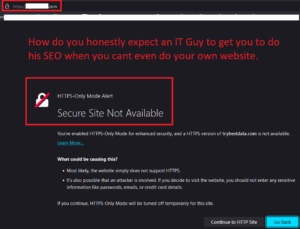
Navigating the Sea of SEO and Web Design Sales: How to Identify Genuine Providers Amidst Automated Harassment

Navigating the Sea of SEO and Web Design Sales: How to Identify Genuine Providers Amidst Automated Harassment

Untitled

Businesses are inundated with offers from SEO and web design salespeople promising to boost their online presence and transform their websites. However, many of these offers are generic and lack any understanding of the unique needs and challenges of the businesses they target. This article explores the prevalent issue of automated harassment by salespeople and offers guidance on how businesses can differentiate genuine providers who prioritize conducting proper due diligence.

The Problem with Automated Harassment:

Automated sales tactics, such as mass emails and cold calls, have become ubiquitous in the digital marketing landscape. Unfortunately, these impersonal approaches often result in businesses being bombarded with irrelevant offers that do little to address their specific needs. Instead of taking the time to understand the nuances of each business, salespeople rely on generic pitches that fail to resonate with their audience.

Lack of Due Diligence:

One of the primary issues stemming from automated harassment is the lack of due diligence on the part of salespeople. Instead of researching the businesses they target, salespeople often resort to a one-size-fits-all approach, offering cookie-cutter solutions that may not align with the unique goals and challenges of their prospective clients. This not only leads to frustration and annoyance for businesses but also undermines the effectiveness of the services being offered.

How to Differentiate Genuine Providers

So, how can businesses separate the wheat from the chaff when it comes to SEO and web design providers? The key lies in identifying providers who prioritize conducting proper due diligence:

  • Look for providers who take the time to research your business before making contact. Genuine providers will demonstrate a clear understanding of your industry, target audience, and current online presence.
  • Seek out companies that ask insightful questions about your goals, challenges, and previous marketing efforts. A provider who is genuinely interested in helping your business succeed will take the time to understand your unique needs and tailor their approach accordingly.
  • Request case studies or examples of previous work that demonstrate a track record of success. Genuine providers will be more than happy to showcase their expertise and highlight how they have helped businesses similar to yours achieve their goals.
  • Ensure their website is accessible and SSL secured. A reputable provider will prioritize the security and accessibility of their own website, reflecting their commitment to best practices in web design and digital security.
  • Evaluate the performance of their website using tools like Google PageSpeed Insights or GTmetrix. A reputable provider will prioritize website performance, including fast loading times and optimized user experience.
  • Check if their website is mobile-friendly using Google’s Mobile-Friendly Test. With mobile usage on the rise, it’s crucial for websites to be optimized for mobile devices to ensure a seamless browsing experience for visitors.
  • Research their own search engine rankings for relevant keywords related to their services. A provider that excels in SEO should have a strong presence in search engine results pages (SERPs) for relevant industry keywords.
  • Review their portfolio and case studies to assess the quality of their work and the results they’ve achieved for previous clients. Look for evidence of successful projects that align with your business goals.
  • Inquire about their technical expertise and certifications. Look for providers who have certifications or accreditations from reputable organizations in the field of SEO, web design, or digital marketing.
  • Request references or testimonials from past clients to get insights into their experience working with the provider. Hearing from satisfied clients can provide valuable reassurance about the provider’s capabilities and professionalism.
  • Evaluate their communication style and transparency in discussing their services, pricing, and timelines. A trustworthy provider will be open and honest in their communication, providing clear explanations and setting realistic expectations.
  • Look for social proof on platforms like LinkedIn, where you can verify their professional credentials and see endorsements from colleagues or clients. Active engagement and positive feedback from their professional network can further validate their credibility.

The Importance of Due Diligence in Provider Selection

Choosing the right SEO and web design provider is crucial for the success of your online endeavors. By conducting proper due diligence and selecting a provider that truly understands your business, you can ensure that your investment yields tangible results. Genuine providers will work collaboratively with you to develop a customized strategy that addresses your specific needs and delivers measurable outcomes.

Alternatives to Traditional Sales Approaches

In addition to conducting due diligence when selecting a provider, businesses can also explore alternative approaches to engaging with potential partners:

  • Look for providers who offer free consultations or audits to assess your current online presence and identify areas for improvement. This demonstrates a commitment to understanding your business and providing tailored solutions.
  • Seek out providers who prioritize building relationships and long-term partnerships over making a quick sale. Genuine providers will invest the time and effort to earn your trust and demonstrate their value as a strategic partner.

It’s more important than ever for businesses to be discerning in their selection of SEO and web design providers. By prioritizing providers who demonstrate a commitment to conducting proper due diligence and understanding their clients’ unique needs, businesses can ensure that their investment in digital marketing yields meaningful results. Remember, the right provider is not just selling a service – they’re offering a partnership that can propel your business to new heights of success.

By thoroughly assessing these technical aspects and conducting due diligence, you can better evaluate the validity of SEO and web design salespeople and make informed decisions when selecting a provider for your business.


This comprehensive guide provides businesses with practical strategies to navigate the influx of sales pitches and identify genuine providers who prioritize understanding and meeting their specific needs.