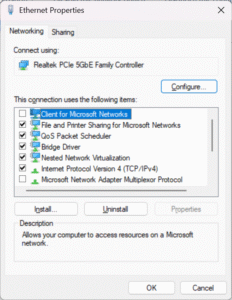
When setting up Windows devices, one of the default components enabled on the network adapter is Client for Microsoft Networks. Most IT providers leave it alone, but the truth is: not every environment needs it, and in some cases, leaving it enabled just increases your attack surface.
What Is it
- Client for Microsoft Networks is the Windows component that allows your PC to authenticate to domain controllers and access SMB file shares.
- Without it, you can’t log into Active Directory or connect to traditional Windows file/print shares.
When It’s Needed
- On-prem Active Directory environments
- Mapped drives / file shares on Windows Servers or NAS devices using SMB
- Legacy printer and network resource sharing
When It’s Not
- Home users and cloud-first businesses running Microsoft 365, Google Workspace, Dropbox, etc.
- Internet-only endpoints where the device never needs to access SMB shares.
- Hardened environments (kiosks, DMZ servers, etc.) where minimal services = minimal attack surface.
Why It Matters
- Legacy baggage – it’s been around since the NT4/2000 era.
- Security implications – extra services mean more opportunities for NTLM relay, credential harvesting, or malicious SMB requests.
- Best practice – disable what isn’t required, keep the networking stack lean.
Recommended Approach
- In domain environments: Leave it enabled, it’s required for correct operation.
- In non-domain environments: Disable it, especially for machines that only need internet/cloud access.
- For file sharing: If you keep it, make sure you’re using SMB3 and modern authentication.
The Bottom Line
“Client for Microsoft Networks” isn’t inherently unsafe, but leaving it enabled on every device by default is sloppy IT hygiene. Evaluate whether it’s needed in your environment. If it’s not, disable it and shrink your attack surface.
At Boss IT Solutions, we don’t just run with defaults. We harden systems for the real world: keeping what’s necessary, stripping out what isn’t, and leaving you with a leaner, safer setup.